Recipe Builder: How We Turn Catalogue Rules into Prompts
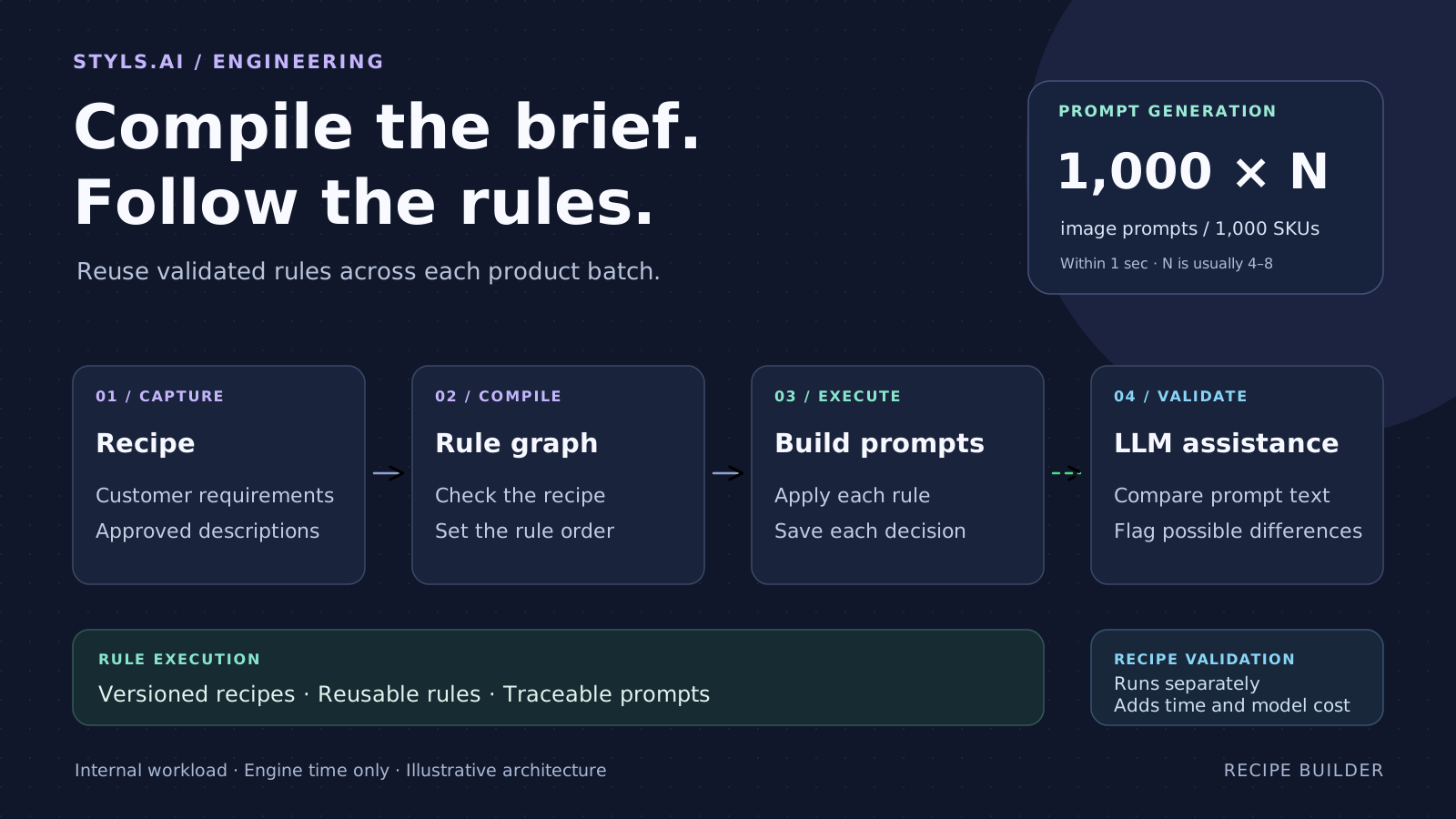
Once a recipe is created and validated, applying its rules is repeatable work. Recipe Builder reuses a compiled execution graph to generate prompts, avoiding repeated LLM generation costs and keeping model-assisted validation limited.
By Vikash Ranjan, Co-Founder & CTO · Published 2026-09-22 · 15 min read
Start with what the customer needs
A fashion brand needs four images of every coat: a front view, a back view, a side view and a close-up of the fabric. Each image must use the approved background. Poses must come from the brand's approved list. A pose with a hand in a pocket is allowed only when the product has a usable pocket. These requirements need to carry through to every product in the catalogue.
Before an image model can create those images, it needs a prompt: written instructions describing what to show. At Styls.ai, Recipe Builder creates those instructions from the customer's requirements and the product data. In our workflow, a SKU means one product with its set of image requirements. A SKU usually needs four to eight images, with a separate prompt for each required image.
One of our biggest reasons for building it was recurring LLM cost. Once a recipe has been created and validated, much of the remaining work is repeatable: apply the same rules to new products. Asking a language model to write every prompt means paying it to repeat work the recipe already defines.
We record the requirements in a recipe and compile it into a rule execution graph: a plan that tells the engine which rules to apply and which information each rule needs. The engine reuses that plan across product batches. LLM assistance has a limited role during validation; it is not responsible for enforcing the recipe's rules.
On our internal workload, the engine generates the required prompts for 1,000 SKUs within one second. That means 1,000 × N image prompts, where N is the number of images required per product, usually four to eight.
Why we moved beyond asking an LLM to write every prompt
A large language model, or LLM, can help interpret a brief and draft instructions. But once the recipe is settled, generating each product's prompts becomes largely a matter of applying known rules. Using a model for all of that repeat work gave us four problems.
We don’t optimise for token consumption. We optimise for repeatable results.
- We pay again for repeatable work. Each new batch adds model usage to read the requirements and write thousands of prompts. The garment data changes, but many decisions about views, backgrounds and styling stay the same. We wanted to reuse those decisions after creating and validating the recipe.
- A rule can be changed while the text still sounds right. A brief may require one exact background, but a model may describe a similar background instead. The wording is fluent; the requirement has still changed. A fixed output format helps with structure, but does not establish that every instruction inside it is correct.
- A missing detail can be hard to notice. A prompt can look complete while leaving out the back view or an instruction about the garment. There may be no error message. The omission only becomes clear when the output is checked against the requirements.
- Long instructions become hard to debug. Each new category or exception adds more text to the model's instructions. If the result is wrong, it can be difficult to tell whether the cause was missing product data, a conflicting rule, or a different choice by the model.
Manually checking every instruction in 4,000–8,000 prompts is not practical for each batch. We needed repeatable execution, automated checks and a way to trace a problem to its source.
If a background must be exact, the engine can copy an approved value. If a pose has conditions, it can check those conditions before choosing the pose. If an input is required, it can report its absence. The recipe gives us a place to define that behaviour and reuse it.
Giving an LLM a checking task does not make it a reliable final authority. Its role is limited to examining prepared text and flagging possible issues during validation. The engine applies the encoded rules, and software checks test the inputs and results. An LLM finding is an additional signal to investigate, and can itself be wrong.
What a recipe contains
A recipe is a saved set of instructions for building prompts. It records the views the customer wants, the information needed about each product, and the rules for filling in each part of the prompt. Each saved version gives us a specific set of requirements to execute and review.
Two other pieces help keep those rules clear. A library is a collection of approved values, such as pose descriptions or backgrounds. A template provides the wording and spaces to fill with values such as the garment, pose and camera view. The recipe says how each space gets its value.
| Customer requirement | What the recipe tells the engine to do |
|---|---|
| Use the approved studio background. | Use the saved background description. |
| Describe the actual garment. | Read the garment description from the product's data. |
| Use a suitable pose for the front view. | Keep only poses allowed for that view and product. |
| Use pocket poses only where appropriate. | Check the relevant product information before choosing a pose. |
| Avoid repeating poses in the shot set. | Check which poses have already been used for that product. |
| Allow an optional styling note to be blank. | Leave out that phrase and record the omission. |
These are illustrative requirements, not a customer's actual recipe. They show how a brief becomes a set of smaller decisions, each with a source and a rule. Teams can bring these requirements in through a spreadsheet or enter them in the application. Both routes use the same engine.
For each part of a prompt, we want to know where its value comes from and which rules it must satisfy.
Compile a plan for applying the rules
Compiling means turning the saved recipe into a form the engine can run. The compiler prepares a plan for applying the requirements to product data. This creates the rule execution graph. Its purpose is to make the recipe’s rules executable, with the information needed for each decision.
The technical name for its structure is a directed acyclic graph, or DAG. A node represents a piece of work or information. An arrow shows a dependency: something that must be available before a later step can use it. “Acyclic” means the dependencies do not loop back on themselves. A step cannot wait for a result that, in turn, depends on that same step finishing.
For example, the engine needs to know whether a garment has usable pockets before it can decide whether a pocket pose is appropriate. The graph expresses dependencies like this so the rules can be applied in the right order.
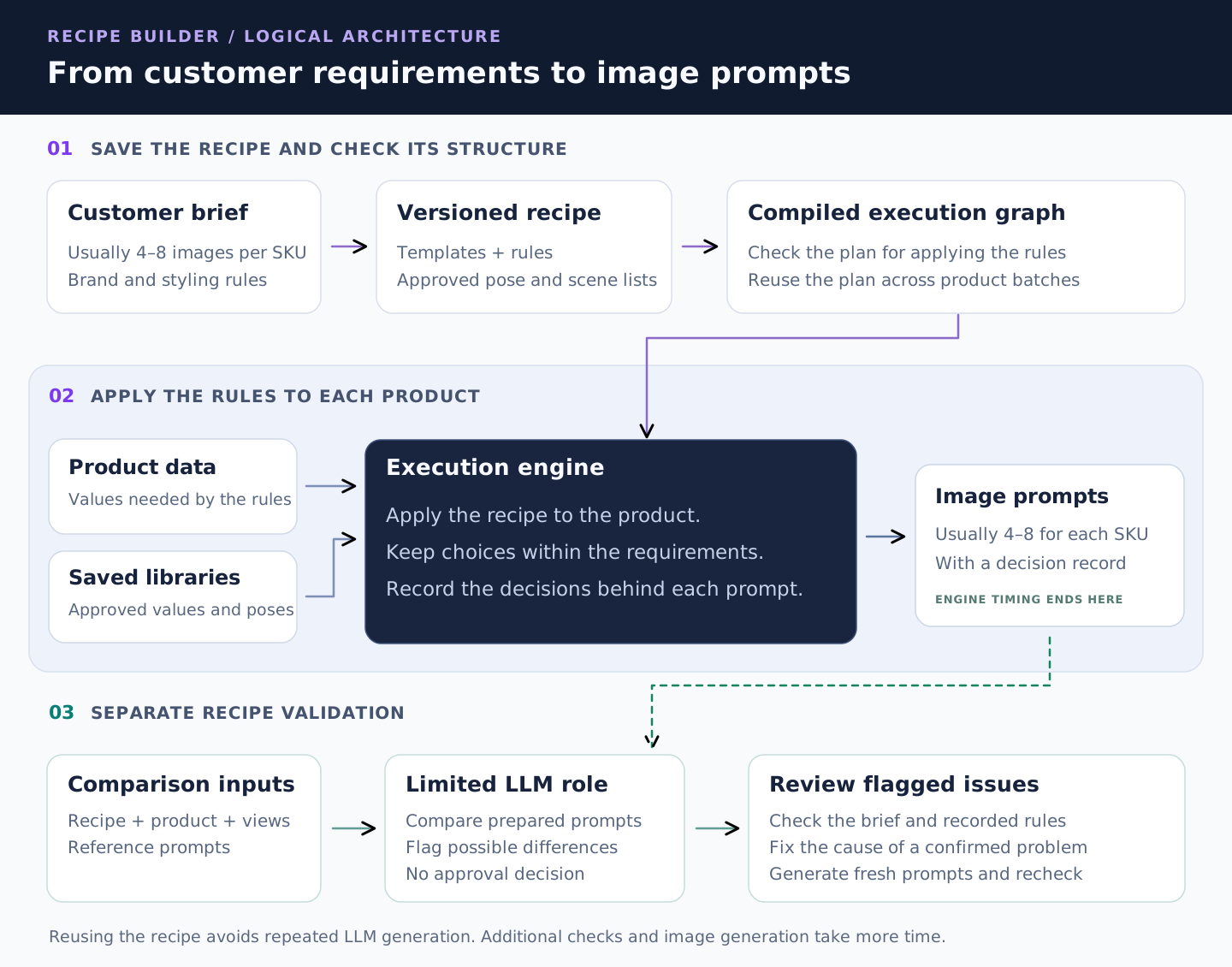
The graph is built from the recipe's own views, fields and rules. A new recipe can therefore produce a different graph without a developer having to write a new workflow for every customer. We save the compiled graph with that recipe version and reuse it for batches of products. Changing the recipe creates a new version to compile and check.
Some checks happen before any product is processed
The compiler checks the recipe's structure. Does a required prompt field have a rule or input to supply it? Does the selected template exist? Does the engine support the requested rule? Do the dependencies contain a loop? These checks can catch a broken recipe before it is used across a catalogue.
Other checks need the actual product data
A valid recipe may still receive an incomplete product row. A pose rule may also have no allowed choice for a particular product. Those cases need to be checked when the engine runs. Compilation prepares and validates the plan; execution applies the rules to the actual values. Both are needed for rule satisfaction.
Follow one product through the engine
Take an illustrative product: a navy coat with usable pockets. The recipe requests a front view, a back view, a side view and a fabric detail. That one SKU needs four prompts, each describing a different image. The shared requirements stay consistent while the view-specific instructions change.
| Required image | What its prompt needs to describe |
|---|---|
| Front view | The front of the navy coat, an allowed pose and the approved background. |
| Back view | The back of the same coat, with the required framing and background. |
| Side view | The coat's side profile and a pose suitable for that view. |
| Fabric detail | A close-up of the coat's fabric, using the required detail framing. |
The other views follow their own rules and templates. The back-view prompt gets the back-view instructions; the fabric-detail prompt gets the instructions appropriate to that view. The shared recipe keeps those requirements connected to the same product.
This also explains why an optional blank needs a different meaning from missing required data. If a styling note is optional, leaving its phrase out may be correct. If a field is required, a blank is reported as a missing required value. The recipe defines which fields are optional and which are required.
Allow variety within the rules
Following rules does not mean every product must receive the same pose. A brand may approve several suitable poses and want variety across its catalogue. The engine can make a random choice at that point, after applying the restrictions.
For the navy coat, several poses may be suitable for the front view. Any choice still needs to respect the background, garment and view requirements, along with any rule about variety across the image set. The customer decides where variation is welcome and where the instruction must stay fixed.
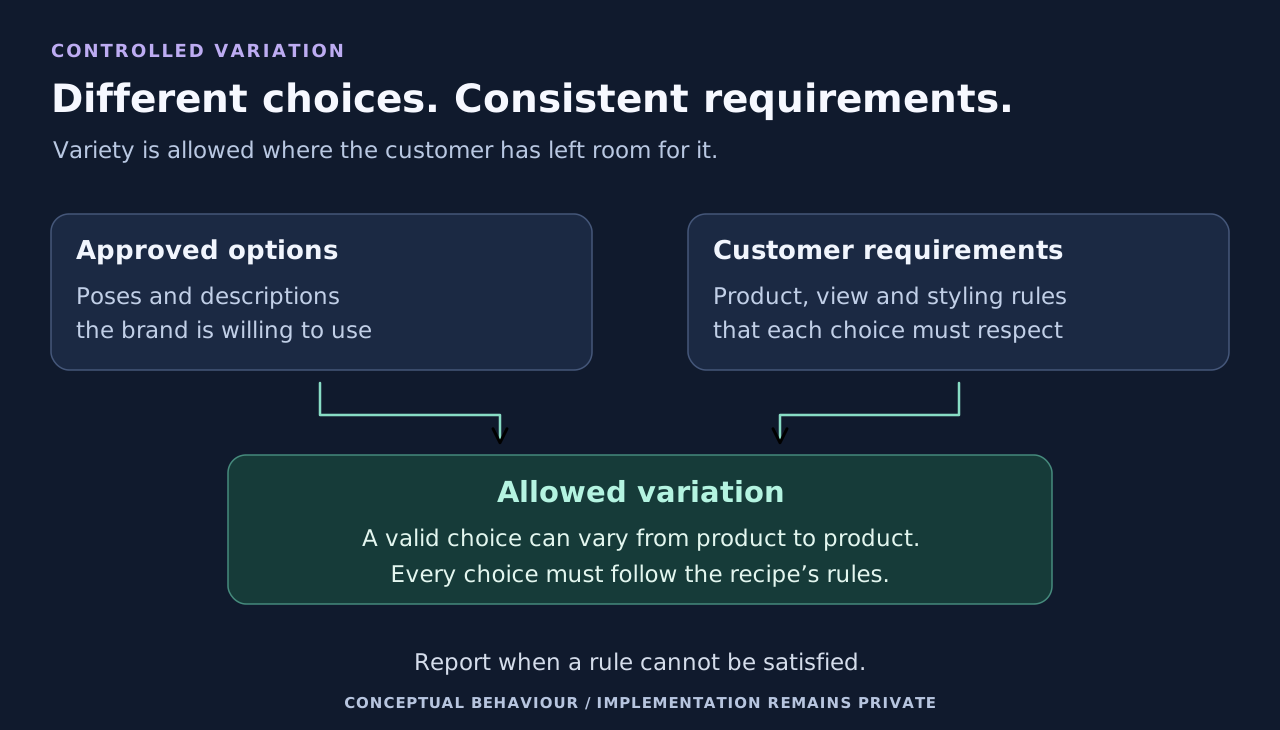
We describe this as controlled variation. Technically, it is constrained sampling: making a random selection from a set that has already been restricted by rules. The graph's main role is to organise rule execution. Some of the decisions within it use randomness.
We save enough information to reproduce a result during an investigation. The team can also request another variation. This makes it possible to explore another valid choice while keeping the customer's requirements fixed.
If the engine cannot meet a rule, it reports the failure. Any permitted exception must be defined in the recipe and recorded alongside the prompt. A mandatory requirement cannot simply disappear because it is difficult to satisfy.
Why repeat batches need less LLM work
Recipe creation and validation take work upfront. Once that work is done, the engine can reuse the compiled recipe. It reads product values, checks conditions, selects allowed options and fills templates. The normal rule-driven path does not ask an LLM to write each prompt, so it avoids that recurring prompt-generation cost on every batch.
For example, suppose a recipe needs six images for each product. A batch of 1,000 SKUs needs 6,000 prompts. The products bring different garment details, but the approved background and view rules can be applied repeatedly by software. The model does not need to write those same instructions anew for each image.
This is also why generation is fast: the engine executes a prepared plan. On our internal workload, it generates prompts for 1,000 SKUs within one second, before additional prompt checks. With the usual four to eight images per SKU, a batch of 1,000 SKUs produces 1,000 × N prompts, typically 4,000–8,000. The exact total depends on the recipe.
Creating and validating recipes, running any LLM-assisted checks, operating the engine and generating images still have costs. The saving comes from removing repeated LLM prompt generation from routine rule execution.
A changed requirement creates work again: update the recipe, create a new version and test it before reuse. Validating one version does not validate all future changes. The engine also cannot enforce a customer requirement that was never recorded, so the recipe needs checking against the original brief.
Validation and the LLM's limited role
Validation has two parts: check the recipe before reusing it, and check the actual product inputs and outputs when it runs. We also have a separate prompt-comparison workflow to help investigate a recipe. That comparison is not an automatic final approval step on every generation request.
| Responsibility | Handled by | What it establishes |
|---|---|---|
| Apply the recorded prompt rules. | Execution engine | The recipe determines the allowed choices and instructions. |
| Check required data, outputs and recipe test cases. | Software checks | Missing values, incomplete outputs and test failures are reported. |
| Compare prepared prompt text during recipe validation. | LLM assistance | Possible differences to investigate, without certifying compliance. |
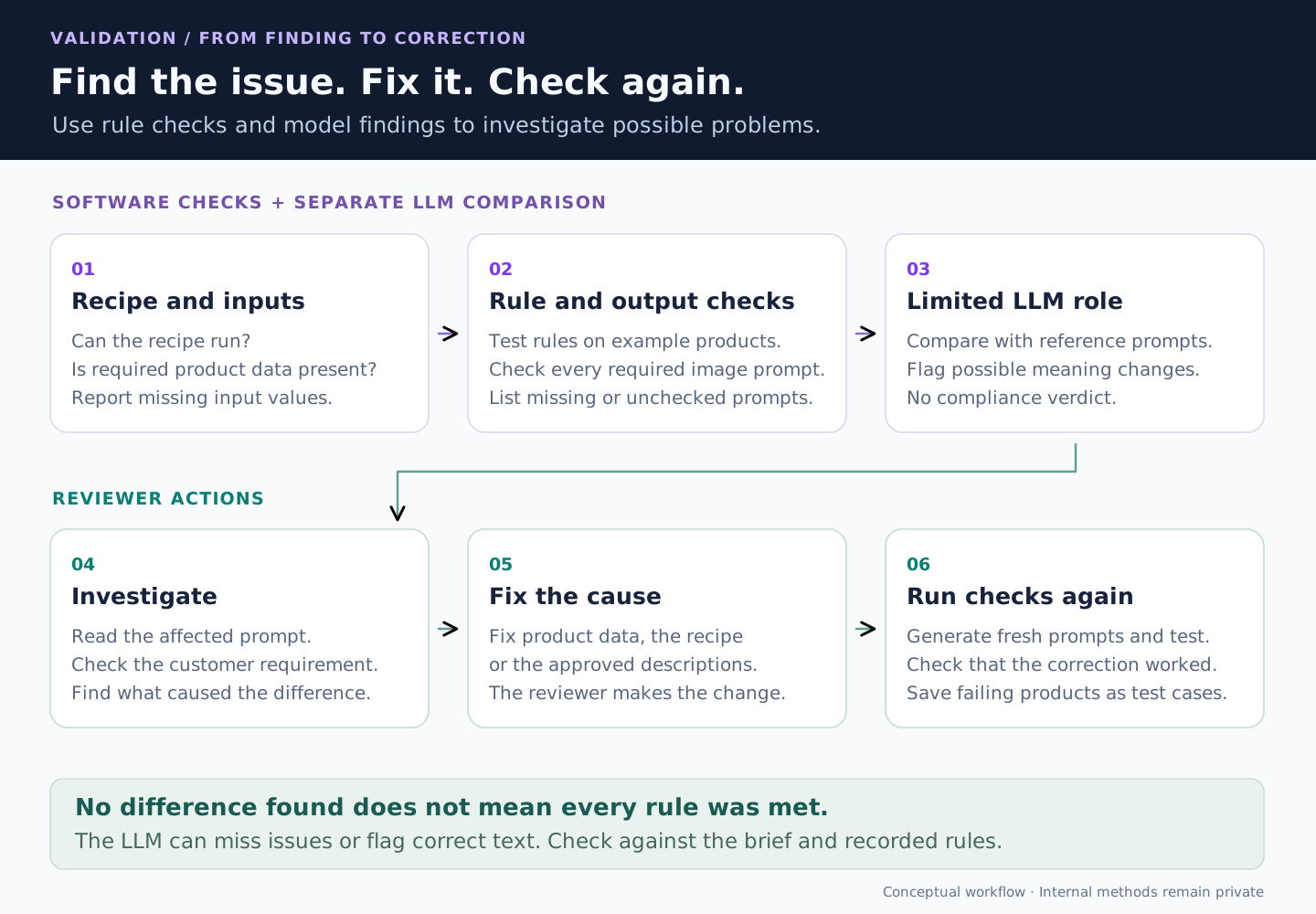
1. Check the recipe and the product inputs
The compiler checks whether the recipe can run. Product checks establish whether the information it needs is present. We can also run a preflight check: a trial of the recipe against the real product batch. Problems point to the affected product, view and field.
An invalid recipe or missing required input can stop generation. Some bulk workflows instead preserve incomplete outputs and report them as warnings so the rest of a batch can continue. In those cases, a completed generation job does not mean every prompt is complete; the reported issues still need attention.
2. Test the recipe against example products and past failures
A recipe test run uses generated example products and saved cases that have caused problems before. It checks for unresolved required fields, missing templates, empty required prompts and failures to meet applicable rules about repeated choices. It also records which rules the tests actually used.
These tests produce a pass or fail result against the checks defined for that recipe. They test the rules we have recorded. Reviewing the recipe against the original brief is still necessary to catch a requirement that was never recorded.
3. Account for the prompts being checked
If a product needs six images, checking five prompts leaves one requirement unchecked. In a comparison run, software accounts for the expected views of each selected product. It lists missing prompts, incomplete text, unmatched views and failed comparisons. The report shows which products, views and templates were covered. An unchecked prompt is never treated as agreement.
4. Give the LLM a small, defined task
The comparison tool gives the LLM two prepared sets of prompts: the engine's output and reference prompts prepared from the same product information and requirements. It asks for possible differences in meaning, separated from wording changes. It does not ask the model to generate a new set of prompts, choose which side is correct or certify that every rule was met.
For example, “show the back of the coat” and “rear view of the coat” may mean the same thing. A front view and a back view request different images. The model can flag that difference for investigation, but the original requirement determines which instruction belongs in the recipe.
The model can miss a difference or flag correct text. Both prompt sets can also share the same mistake. No difference found is not proof of correctness. Its findings do not automatically rewrite prompts, change recipe rules or approve a batch.
5. Find and fix the cause
The team can inspect the affected product and view and use the decision record to investigate. Repeated findings can be grouped by requirement, making a shared rule or template a useful place to look. This supports targeted investigation instead of manually reading every prompt in every batch.
Suppose a prompt asks for a pocket pose on a garment without usable pockets. If the product data incorrectly says pockets are present, correct that data. If the recipe omitted the pocket condition, correct the recipe. If an approved pose description is unsuitable, correct the library. If the engine is right and the reference is wrong, changing the engine would introduce a new mistake.
6. Run the checks again and save test cases
After a recipe, library or input correction, generate fresh prompts and run validation again. This checks whether the change resolves the original issue and whether other tested cases still work. Comparing the old prompt text again cannot establish that a recipe change worked.
If only the comparison needs attention, the team can repeat it using saved prompts. A product that exposed a failure can also be saved as a regression case: a test example included in later recipe tests to help catch the same problem returning.
Comparison runs separately from prompt generation and saves progress so interrupted checks can resume. Its report lists completed comparisons and prompts that were not checked. Generation plus additional checks takes longer than generation alone; those checks are outside the engine's one-second figure.
Make each result easy to explain
Imagine someone asks, “Why did this coat get that pose?” The finished prompt shows the choice, but not how it was made. Recipe Builder saves a decision record alongside the text, so the team can trace the result to its inputs and requirements and see any recorded exceptions to the rules.
That record helps the team find the right place to make a correction. Incorrect pocket data calls for an input fix. An unsuitable pose in the approved list calls for a library fix. A rule that allows too many poses calls for a recipe change. Those are different problems, with different solutions.
Repeat a result
Reproduce an unexpected prompt so the team can investigate the same result.
Keep approved recipes stable
Save each recipe version so the team can review changes before using the new version.
Request another variation
Generate another variation that follows the same customer requirements.
Find patterns in failures
Group verification findings by the affected requirement, so a repeated issue can lead back to one rule or template.
How this fits the catalogue workflow
Recipe Builder turns customer requirements into prompts for image generation. It gives the next stage clear instructions and gives the team a record of how those instructions were built. The generated image then needs its own checks: an image model can still miss a garment detail even when the prompt is correct. Our Auto QC system checks the image against the garment reference and production requirements.
Writing a recipe takes work upfront. Someone must clarify the brief, decide which fields are required, and approve the available choices. A new kind of requirement may need a new rule operation. Once that work is done, the same recipe can be applied across a catalogue without asking an LLM to repeat the prompt-generation work for every product. Versioning keeps changes explicit, and the decision record helps the team investigate individual results.
The full flow is straightforward: capture the requirements, compile the rule execution graph, apply it to each product, check the resulting prompts, and correct and recheck issues found during review. This makes rule adherence a visible part of how the system runs, from the customer's brief to the instructions passed to the image model.