Evolving the Fix-and-Regenerate Loop with ProceduralGraph
How we use skillwiki to improve instructions and ProceduralGraph to help an agent choose its next step, with production controls and tests that compare quality and cost.
By Vikash Ranjan, Co-Founder & Chief Technical Officer · Published 2026-09-19 · 15 min read
Knowing how to use a tool is only part of the job
An image agent can know how to use every tool and still make poor decisions. It might repeat a repair that did nothing. It might generate a whole new image when a small fix would have worked. Or it might assume that an image is correct just because a tool finished without an error. The agent needs good instructions and a good way to choose its next step.
Our agent checks generated images, tries to fix problems, and checks the result again. Sometimes it needs to generate a new image. We call that regeneration. The repeated process of checking, fixing or regenerating, then checking again is the fix-and-regenerate loop.
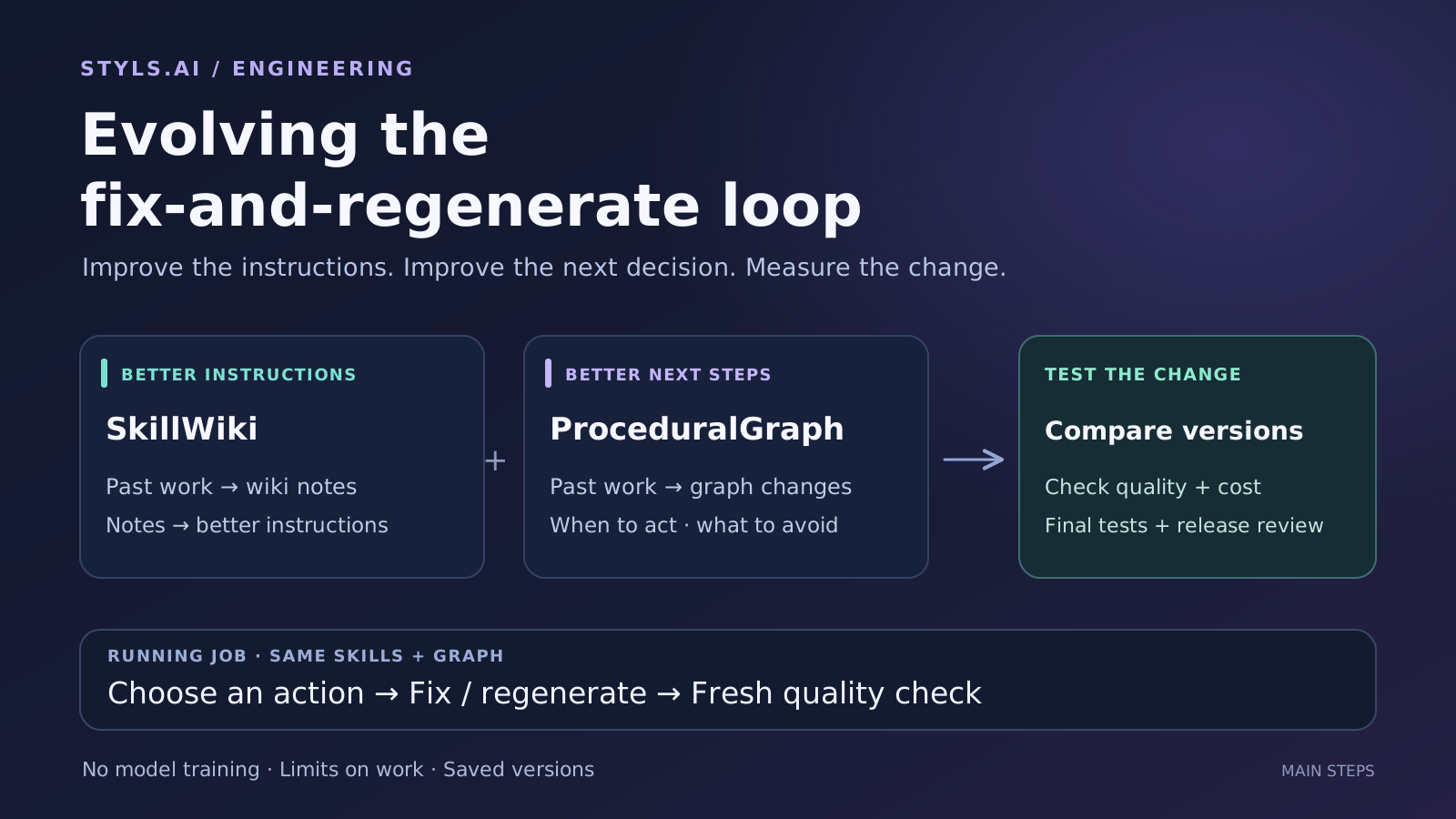
We use two open-source projects to improve the instructions around this loop. SkillWiki helps improve how the agent performs a step. ProceduralGraph helps improve advice about which step to take next. We have connected both to the same process for proposing changes, testing them and reviewing them before use.
The surrounding software is often called the harness. It gives the model its instructions, connects it to tools, tracks what happened and decides when the job is done. That is the part we are improving. The model itself stays unchanged: we do no model training or fine-tuning in this loop.
This post explains how the two projects fit together, what we added to handle real operating conditions, and how we test whether a suggested change helps. Both projects are available on GitHub:
- SkillWiki on GitHub — learn from past work and suggest better instructions.
- ProceduralGraph on GitHub — suggest better guidance about the next action, then test the change.
A procedural graph is a map of possible next steps
The idea comes from the paper Procedural Graphs: Self-Evolving Execution Structures for LLM Agents, by Yuxing Lu, Yicheng Chen, Shanchan Wu and Sercan Ö. Arık. A graph has nodes and edges: think of them as boxes and arrows. A box can represent a tool, a reasoning step or a task state. An arrow connects steps and can carry a condition, advice or a warning.
During a task, the agent receives guidance from the relevant part of this map. Between tasks, a model examines records of successful and failed work and suggests changes to the map. This model is called the refiner. Its changes are tested, and rejected suggestions are remembered for later rounds.
We built our own implementation of this research as the ProceduralGraph package. It contains the code for storing graphs, preparing guidance, proposing changes and connecting those changes to tests. An application using the package supplies its own tools and rules for success. Our private image-processing rules are not part of the package.
SkillWiki improves the instructions; ProceduralGraph improves the next-step advice
In our earlier post on improving QC skills with WikiSkill, we described how past work can lead to better written instructions. WikiSkill is the name of that research method. The Python package we built from it is called skillwiki.
SkillWiki reads records of what the agent tried and what happened. These records are called traces. One role, the maintainer, collects useful patterns in a wiki. Another role, the proposer, reads those patterns and suggests an instruction change. The agent doing the real work only receives instructions that have been released for use; it does not read the growing wiki.
ProceduralGraph looks at the order and conditions of actions. It can suggest a different connection between steps, a clearer condition for using a tool, or a warning about an action that keeps failing. The two packages work independently. Our application connects them and tests the changes they suggest.
How should I do this step?
SkillWiki can improve an instruction about what to inspect, how to use a tool, or how to check its result.
What should I do next?
ProceduralGraph can improve advice about which step fits the situation and which action is unlikely to help.
For example, imagine a repair tool reports success, but a new quality check still finds the original problem. SkillWiki might suggest a clearer instruction for checking the repair. ProceduralGraph might suggest a warning against repeating that repair when nothing relevant has changed. These are possible improvements, not proven ones. Each changed version still has to be tested.
One loop fixes images; the other improves future runs
While a job is running: check, act, check again
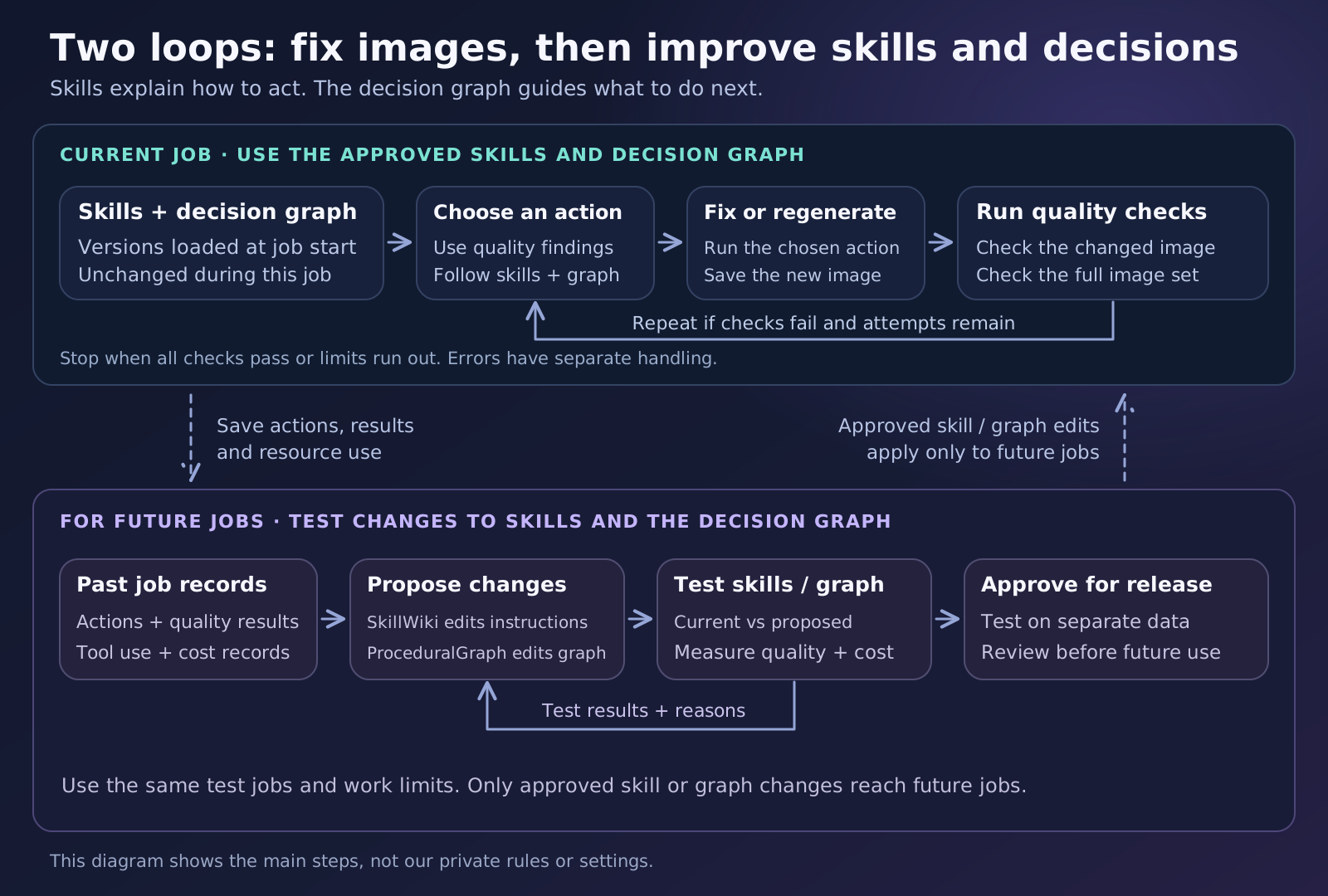
Our application gives the agent the current image, the problems found by quality control and the actions it is allowed to take. The agent chooses an action. A tool then changes the image, or a generation step creates a new one. The changed image must receive a fresh quality check before the next decision. A tool finishing successfully does not prove that the image is correct.
The job is complete only when every required image passes, including checks that apply to the set as a whole. Until then, the agent can keep working within the regeneration and tool-use limits assigned at the start. If those limits run out, it stops. An unfinished job stays unfinished; it does not become a pass because the budget is exhausted.
Errors need separate handling. For example, if a paid request times out, we may not know whether the provider finished it or charged for it. The system has to resolve that uncertainty before deciding whether it should try again.
In our current integration, code uses the recorded action and result to find the relevant part of the graph. It adds a small amount of graph advice to the instructions already sent to the agent. We do not ask an extra model to write this advice at every step. If the software cannot reliably find the right part of the graph, it continues with the existing instructions alone. The public package also supports a mode where a separate model writes the advice.
The graph offers advice. Our application code still controls which tools may run, how much work is allowed and which quality checks must pass. A suggested graph change cannot remove those checks or grant a new tool permission. The same instructions and graph version stay in use from the start of a job to its end.
Between jobs: propose a change and test it
The second loop uses past work whose outcomes have been recorded and whose data we are allowed to use. SkillWiki suggests instruction changes. ProceduralGraph suggests graph changes, also called mutations. Our application checks each suggestion, saves a proposed version and records where it came from.
We call this proposed version a candidate. Producing a candidate does not make it better than the current version. It is simply ready to test. We compare it with the current version on the same tasks and under the same limits.
In the code, separating the proposal from its later test is called deferred evaluation. The package can finish suggesting a change while the application keeps it waiting for assessment. A promising test result then needs a final check on separate data and a release review before the change can be used on real jobs.
What we added to make this practical to operate
A prototype can assume that a run finishes, a file stays unchanged and a model returns the expected format. Real systems need to handle restarts, overlapping work, corrected results and incomplete responses. The table below separates what the public package provides from what our application has to control.
| Problem | What the package provides | What our application controls |
|---|---|---|
| Two workers update the same graph | Keep a history of versions and check which version a writer started from. | Refuse an update if another worker has already changed the latest version. |
| A suggestion is broken or repeats an old failure | Check the graph and recognise previously rejected changes before paying for another test. | Allow only references to tools and instructions that the application supports. |
| Saving a suggestion changes its form | Check and test the version returned by the application after it saves the suggestion. | Make sure the version tested is exactly the one considered for release. |
| A run stops after paid work has started | Save progress and limit model calls, tests and run time. | Track spending and resolve uncertain requests before allowing more paid work. |
| A model returns an unexpected answer | Read edits in a defined format and return useful error messages. | Check settings before making a paid call, record usage and reject unsupported commands. |
| A human corrects an earlier result | Keep the history and identify records from older graph versions. | Mark affected results and suggestions as no longer valid, while preserving the old records. |
| One good score hides another problem | Compare named measures such as quality and resource use, and explain the decision. | Set the rules for accepting a change and reviewing it for release. |
Checking a graph’s structure is useful, but limited. It can catch a connection to a missing step. It cannot tell us whether the advice will help the agent finish an image job. That needs a separate test.
Saved progress also needs care. A checkpoint records work that is known to have finished, so a restarted run can reuse it. A request with an unknown outcome is different. Repeating it without checking could mean paying twice for the same work.
Both packages use compatible ways to save and load versions. An application can therefore connect them to the same storage system without merging the packages. Developers can find the connection points in the public integration guide. In those docs, host means the application using the package.
Decide what “better” means before testing a change
A higher success rate is useful, but it does not answer every question. Two versions might finish the same amount of work while one needs many more regenerations. A version that gives up early might look cheap simply because it leaves jobs unfinished. We need to measure both the result and the work used to reach it.
We added support for explicit objectives in ProceduralGraph 0.3.2. An objective is a written set of rules for what counts as an improvement. It tells the test what to measure and tells the decision rule which results are acceptable. Asking a model to “improve quality and reduce cost” does not supply those rules by itself.
One comparison, three parts of its setup
These three API records work together to describe one comparison. They store settings; none runs a test on its own. Suppose we want to compare the current graph with a proposed graph using two measures: job completion and paid calls.
MetricSpec: define each measure. We create one record for job completion and another for paid calls. A higher completion rate is better; fewer paid calls are better. Each record states the unit, possible range and how large a change must be to matter. It can also set a required minimum or maximum average, such as a minimum completion rate.ObjectiveSpec: combine the measures and set the rule. This record contains bothMetricSpecrecords. It says how to compare their results and how much evidence is needed. For example: compare completion first, and consider paid calls only when the evidence shows that completion is close enough to count as the same.ObjectiveContext: the test setup used for this comparison. This record says which jobs we test and under what conditions: the version of the checking code, regeneration and tool limits, and how each measure is calculated. It links to theObjectiveSpecused for the comparison. It also records whether the data is for developing the change or for the final check before release.
The application then tests the current and proposed versions on the same jobs under those conditions. It records completion and paid calls for each job, then compares the results using the agreed rules. All three kinds of record are used in that one comparison.
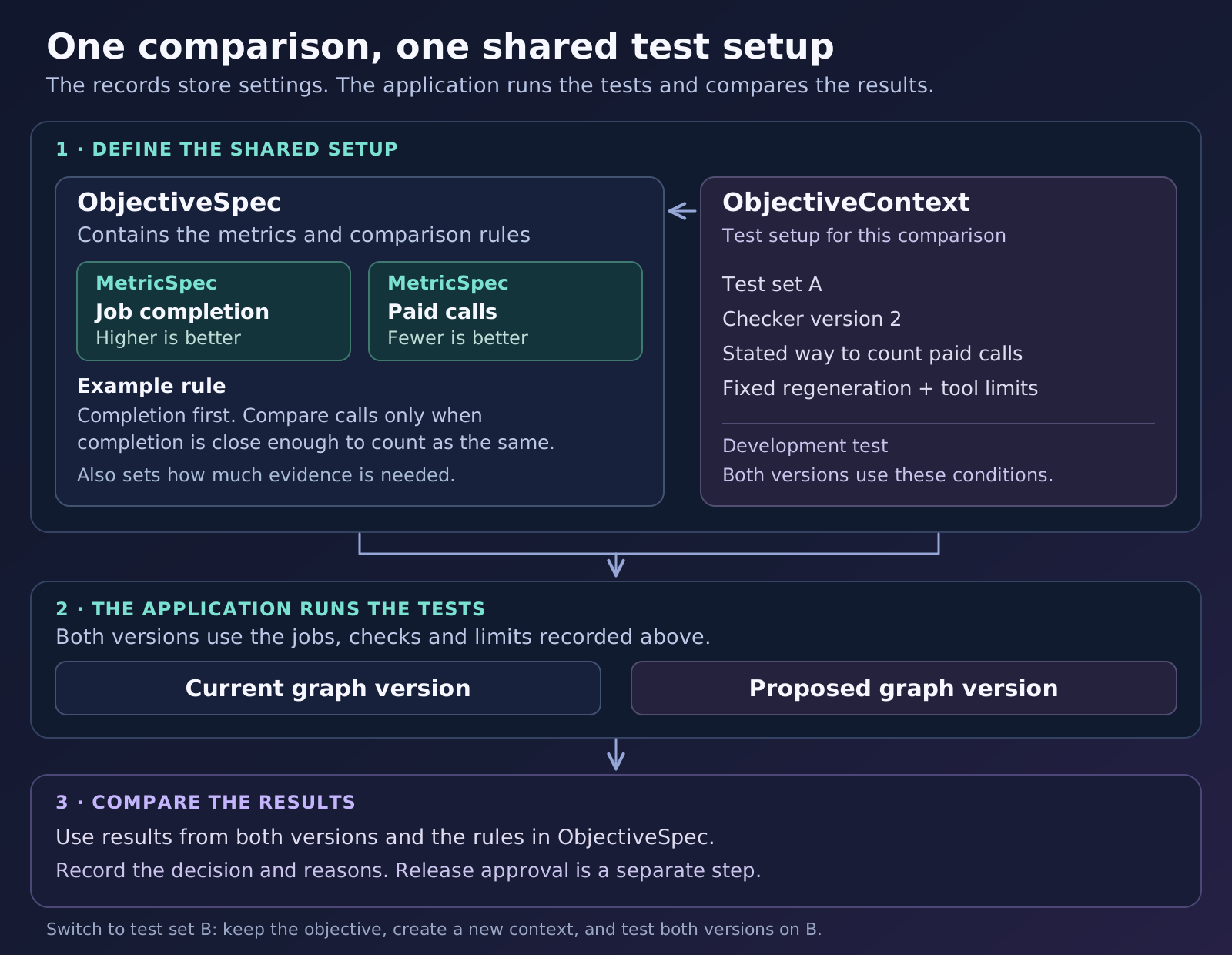
We fix these settings before testing. The model suggesting graph changes cannot rewrite the objective after seeing the results. If we change the jobs, limits or way of measuring cost, we have changed the test. Its results cannot be mixed with the old ones as if nothing changed.
Option one: compare in a chosen order
This is called a lexicographic objective in the API. For a quality-first example, first check any required limits, then compare quality. If the evidence shows a meaningful improvement, that can justify accepting the candidate for further development. If it shows a meaningful drop, reject the candidate.
Only move on to cost when the evidence shows that quality is close enough to count as the same. “Close enough” has a tolerance chosen before the test. This is called equivalence; it does not mean the numbers have to be identical. If there is not enough evidence to decide, leave the result unresolved. A lack of evidence about quality is not permission to pick the cheaper version.
Our application uses this ordered approach, with task quality ahead of resource reductions. The detailed rules stay private. There is an important limit to the claim: a version accepted because its quality improved may still use more resources. A quality win does not, by itself, prove a cost saving.
Option two: protect all chosen measures at once
The package also offers a Pareto objective. Under this rule, no measure being optimised may get worse beyond its allowed tolerance, and at least one must improve. A version that is cheaper but clearly worse in quality therefore cannot pass just because it saved money. The trade-off remains visible for the application to handle.
Both options make the choice explicit. They avoid hiding a quality loss inside a single combined score where enough cost savings might cancel it out.
Give both versions the same jobs and limits
To compare fairly, run the current version and the proposed version on the same jobs. Give both the same limits on regenerations and tool use. Judge whether each completes the whole job, including every required image and quality check. One image passing is not enough if the rest of the required set is unfinished.
Keep failed attempts in the totals. A tool that failed or changed nothing still used an attempt and may still have cost money. Missing results must stay visible too; dropping difficult jobs from the test could make a version look better than it is.
Fewer tool calls and a smaller bill are different claims. They need different measurements. If billing is incomplete, record the cost as unknown rather than zero. Include the cost of extra guidance as well. Even our approach, which adds no separate guidance-model call, puts more text into the agent’s prompt. That extra input belongs in the accounting.
How do we avoid mistaking luck for an improvement?
The public objective checker uses a method named paired_hoeffding_v1. “Paired” means comparing the two results for the same job before combining results across jobs. This helps keep a run of easy jobs from being compared with a run of difficult ones.
The Hoeffding part uses the possible range of each measurement to work out an uncertainty range around the average difference. The checker uses that range when deciding whether there is enough evidence of an improvement, a drop, or results that are close enough to count as equivalent. It also shares the allowed risk of a wrong conclusion across the measures it checks.
Separate jobs supply the independent evidence. If we run the same job several times, we combine those runs into one job-level result using a rule chosen in advance. Repeating one job does not give us the same amount of independent evidence as testing many different jobs.
With too few jobs, the honest answer may be “we cannot tell yet”. That is different from proving the versions are equivalent. Also, repeatedly changing a graph to do well on the same test set can make it work for those examples but fail on new jobs. We therefore keep a separate final check whose results are not fed back into the models suggesting changes.
Tell the next attempt why the last change failed
“Rejected, score 0.7” gives the model little help. “Quality fell while tool use stayed the same” is much more useful. The next suggestion should be based on what went wrong, not just the fact that it lost.
Version 0.3.2 saves the reasons for each decision, the measurements, their uncertainty ranges and the two graph versions that were compared. Later attempts can read that feedback alongside the original objective. The rules stay fixed while the proposed graph changes.
Our application returns measured results from development tests to both SkillWiki and ProceduralGraph. A candidate still waiting for a test is marked as unmeasured, not as a quality failure. If a human later corrects a result, affected records stop being valid inputs for new suggestions. The old records remain in the history so we can see what changed and why.
| What the test finds | What it means |
|---|---|
| The agent uses fewer steps, but quality clearly gets worse. | Lower resource use does not make the quality failure acceptable. |
| There is enough evidence that quality is equivalent and resource use improves. | The change may pass the development test if it meets all the other rules. Release review still follows. |
| There are too few results to reach a clear conclusion. | Keep the result unresolved. Do not call it an improvement or a tie. |
| A cost record needed for the comparison is missing. | We cannot claim a saving from incomplete cost data. |
What we have built and what we still need to prove
Both packages are connected to our system for proposing changes, saving them and returning test feedback. The code for adding graph advice to the running agent is also implemented. Proposed changes wait for assessment and go through the application’s release process.
We have used real model responses with made-up example traces to check that both packages can produce valid candidates. Automated tests also cover invalid changes, spending records, reuse of completed work and error handling.
These checks show that the integration works. They do not yet prove that it improves quality or reduces cost on real jobs. We are not reporting a percentage improvement or a saving here. Those claims need complete-job comparisons and a separate final check before release.
Get the code on GitHub
Both projects are open source. You can read the code and try them with your own agent:
- SkillWiki: github.com/vikm2o/skillwiki — turns records of past work into suggested instruction changes.
- ProceduralGraph: github.com/vikm2o/proceduralgraph — improves next-step guidance and tests graph changes against a chosen objective.
ProceduralGraph is released under Apache-2.0. Its core needs no extra Python packages to run. The version described here is 0.3.2. The new objective checker is optional. Applications already using their own acceptance rules can keep them.
pip install "proceduralgraph @ git+https://github.com/vikm2o/proceduralgraph@0.3.2"Start with the repository’s objective example. It runs locally without an API key and shows both comparison rules, unknown costs, tests left for the application to run later, and recovery after an interruption. The paper-differences document explains which parts follow the research and which we added for practical use.
To use it in your system, bring your agent, tools, records of past work and a way to check results. Choose what “better” means before starting. Then test each proposed change against a current version you can run again under the same conditions.